


A stable Wi-Fi signal and a quiet café used to define remote work. That is changing. A growing number of professionals now run their businesses from converted vans, mountain cabins, and beachside campsites — places where a portable power station replaces the wall outlet entirely.
This guide covers the gear, the power math, and the workflow adjustments you need to take your office off the grid in 2026 — without losing a single billable hour or client deadline.
Every recommendation below is based on real-world setups used by digital nomads and remote teams working from the road.
Why the Off-Grid Office Went Mainstream
Three shifts made this possible. Satellite internet from providers like Starlink now delivers reliable broadband to locations that had zero connectivity five years ago. Remote-work policies became permanent at most major tech companies. And portable power technology matured to the point where a single battery unit can sustain a full workstation for an entire day.
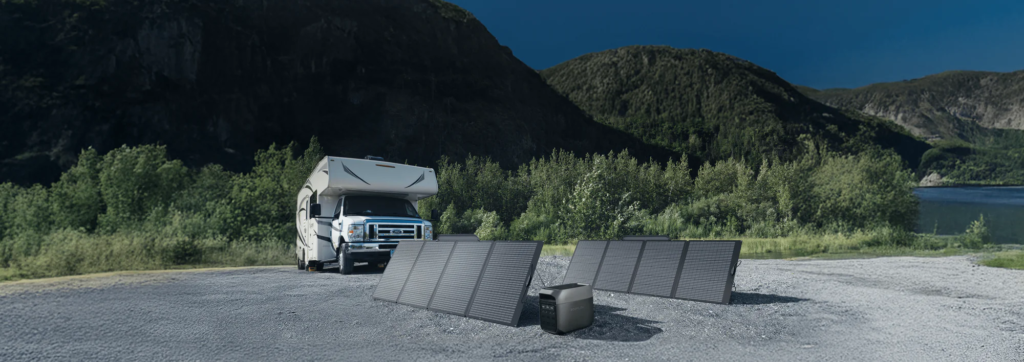
The result is a new class of worker who treats location as a variable, not a constant. A portable power station, a solar panel, and a satellite dish now form the minimum viable office for anyone willing to leave the cubicle behind.
Digital nomad visas in over 60 countries now recognize remote workers as legitimate residents. The infrastructure exists. The question is no longer whether off-grid work is feasible — it is whether your gear can keep up with your ambition.
The Gear Stack for Off-Grid Productivity
Going off-grid for work is not just about finding a scenic spot. It requires a specific set of tools, each solving a different problem. Here is the core stack, ranked by priority.
Internet First
Without internet, nothing else matters. Starlink Mini is the current standard for nomadic workers, delivering download speeds that handle video calls and cloud-based collaboration tools in most locations worldwide. Pair it with a mobile hotspot from a different carrier as a fallback for when satellite coverage drops.
Portable Power
A portable power station is the second most critical piece of gear. It powers your laptop, router, monitor, and lighting from a single LiFePO4 battery pack. Look for units with solar input, fast AC charging, and enough capacity to cover a full workday without rationing.
Workspace Setup
A comfortable workspace prevents fatigue during eight-hour sessions. Most remote workers underestimate how quickly a bad setup degrades focus and output. Pack these essentials to stay productive beyond the first few hours:
- A foldable laptop stand to bring the screen to eye level
- A compact Bluetooth keyboard for a natural typing angle
- Noise-canceling headphones to block wind, traffic, and campsite noise
If you use an external monitor, choose a portable USB-C display that draws power directly from your laptop. This avoids pulling extra wattage from your main battery and extends your total working hours.
Redundancy
Dead gear means lost income. Carry a second phone with a different carrier’s SIM for backup connectivity. Keep a 20,000 mAh power bank charged as a last-resort laptop backup. Store critical files locally in addition to the cloud so a connectivity outage does not halt your workday.
How to Build a Daily Power Budget
Running out of power mid-call is the fastest way to lose a client’s confidence. A clear daily power budget prevents that. The math takes ten minutes and pays for itself within the first day on the road.
Know Your Device Draws
Every device pulls a specific number of watt-hours per hour of use. Add them up for a typical workday to get your baseline. Here is what a standard remote setup looks like:
- Laptop (active use): 50–80 Wh per hour
- Portable USB-C monitor: 15–30 Wh per hour
- Starlink Mini: 20–40 Wh per hour
- Phone and accessories charging: 10–20 Wh per hour
A typical eight-hour workday totals 750 to 1,350 Wh depending on your gear. That number is the minimum your portable power station needs to deliver before its next recharge cycle.
Plan for Recharging
Solar panels are the primary recharge method off-grid. A 200 W panel generates roughly 600 to 1,000 Wh per day under good sun conditions. On cloudy days or in heavily shaded campsites, a 12V car charger picks up the slack during driving hours.
Right-Sizing Your Battery
Match your battery capacity to at least 1.5 times your daily draw. This buffer accounts for efficiency losses, temperature drops, and the occasional day when recharging is not possible. A portable power station in the 1,500 to 2,000 Wh range covers most remote workers with room to spare.
Choosing the Right Portable Power Station
Not every unit on the market suits the demands of a remote professional. The table below matches common work styles to the features that matter most when picking a battery for your mobile office. All specs reflect manufacturer data available as of mid-2026.
| Work Style | Min. Capacity | Key Feature | Recommended Model |
|---|---|---|---|
| Café nomad (backup only) | 1070 Wh | Lightweight, grab-and-go | Jackery Explorer 1000 v2 |
| Part-time van lifer | 1,000–2,000 Wh | Fast AC charging, solar input | Anker SOLIX C1000 Gen 2 |
| Full-time off-grid | 4,000+ Wh | Expandable capacity, high output | EcoFlow DELTA Pro 3 |
EcoFlow’s X-Core 3.0 fast-charging architecture stands out for professionals who move frequently. A portable power station that reaches 80 percent charge in under an hour means less downtime and more hours working from wherever you choose.
Field-Tested Tips for Working Off the Grid
Theory and reality diverge the moment you open your laptop under a tree with no outlet in sight. These field-tested habits, drawn from digital nomads and van-based remote workers, help close the gap between a careful plan and a productive workday on battery power.
Start with a Weekend Dry Run
Before committing to a full week off-grid, test your entire setup over a weekend. Run your normal workday routine on battery power alone. A dry run reveals problems you cannot spot on paper:
- Devices that draw more power than their spec sheet claims
- Solar panel positions that underperform in real conditions
- Workflow bottlenecks caused by limited charging windows
Discovering these gaps two hours from home is far easier to fix than finding them 200 miles from the nearest campground with electrical hookups. One weekend test often saves a full week of frustration.
Protect Your Work Rhythm
Schedule power-hungry tasks — video calls, large uploads, software updates — for times when your portable power station is fully charged or plugged into shore power. Save lighter tasks like writing and planning for low-battery stretches. This habit extends your off-grid runtime without cutting into productivity.
Know When to Plug In
Going fully off-grid every single day is not always practical or necessary. Co-working spaces, libraries, and café stops let you recharge gear, back up files, and handle bandwidth-heavy meetings on reliable connections. Treat grid access as a strategic refueling stop rather than a concession.
The Setup That Keeps Working
Off-grid remote work is no longer experimental — it is a proven workflow for thousands of professionals worldwide. The key is building a system where power, connectivity, and redundancy work together without daily troubleshooting.
A reliable portable power station anchors the whole system. EcoFlow’s DELTA Pro 3, with its 4,000 W output, sub-hour recharging, and expandable battery architecture, handles the heaviest off-grid workloads without compromise. Start there, and build the rest of your mobile office around it.
